11.2 Splines
Another common approach to performing non-parametric or semi-parametric inference is using splines. These are piecewise polynomial functions that allow for approximating complex relationships in data.
To clarify ideas, let’s begin with a simple univariate case. The starting point is to assume that
\[
y_i = f(x_{i}) + \mu_i,
\]
where \(\mu_i \sim N(0, \sigma^2)\) is independent of the regressor \(x_{i}\), and \(f(x_{i})\) is a smooth function such that nearby points in the support of \(x_{i}\) should have similar values. Observe that this means we must always sort the data in increasing order according to \(x_i\). This has no effect, as we assume a random sample. The index \(i = 1,2,\dots, N\) represents the observations.
The spline approach defines
\[\begin{align}
f(x_{i}) = \beta_{1}b_1(x_{i}) + \beta_{2}b_2(x_{i}) + \dots + \beta_{H}b_H(x_{i}) = \boldsymbol{b}(x_{i})^{\top}\boldsymbol{\beta},
\tag{11.1}
\end{align}\]
where \(\boldsymbol{\beta} = [\beta_{1} \ \beta_{2} \ \dots \ \beta_{H}]^{\top}\) and \(\boldsymbol{b}(x_{i}) = [b_1(x_{i}) \ b_2(x_{i}) \ \dots \ b_H(x_{i})]^{\top}\) are the vector of parameters and the vector of spline basis (B-splines) function values at \(x_{i}\), respectively.
Note that in this setting, there is only one regressor; however, there are \(H\) location parameters. Given \(N\) observations, the design matrix is: \[\begin{align*} \boldsymbol{W}=\begin{bmatrix} b_1(x_{1}) & b_2(x_{1}) & \dots & b_H(x_{1})\\ b_1(x_{2}) & b_2(x_{2}) & \dots & b_H(x_{2})\\ \vdots & \vdots & \ddots & \vdots \\ b_1(x_{N}) & b_2(x_{N}) & \dots & b_H(x_{N})\\ \end{bmatrix}. \end{align*}\] Thus, we have a standard linear model where we can proceed as in Chapter 3.
Actually, Equation (11.1) represents the basis function approach, where \(\boldsymbol{b}(x_{i})\) is a specified set of basis functions, such as B-splines. However, other functions derived from the Fourier transform, Gaussian radial basis functions, wavelets, etc., can also be used. Here, we focus on the most popular case: cubic B-splines. However, the same ideas apply to other basis functions. In particular, cubic B-splines provide the lowest degree necessary to generate sufficiently smooth curves; the first and second derivatives are nonzero, which is not the case with constant and linear splines (O. A. Martin, Kumar, and Lao 2021).
Thus, from Equation (11.1), we see that a spline is a linear combination of \(H\) B-splines. The latter are polynomials of a certain degree, meaning that splines are piecewise polynomial functions. Any spline function of order \(n\) can be expressed as a linear combination of B-splines of order \(n\), and B-splines serve as the basis functions for the spline function space.
The cubic B-spline is \[\begin{align*} b_{h,3}(x_i)=\begin{Bmatrix} \frac{u^3}{6} & x_h \leq x_i < x_{h+1}, & u=(x_i-x_h)/\delta\\ \frac{1+3u+3u^2-3u^3}{6} & x_{h+1} \leq x_i < x_{h+2}, & u=(x_i-x_{h+1})/\delta\\ \frac{4-6u^2+3u^3}{6} & x_{h+2} \leq x_i < x_{h+3}, & u=(x_i-x_{h+2})/\delta\\ \frac{1-3u+3u^2-3u^3}{6} & x_{h+3} \leq x_i < x_{h+4}, & u=(x_i-x_{h+3})/\delta\\ 0 & \text{otherwise} \end{Bmatrix}, \end{align*}\] where \(x_{h+k}\) are called the knots, for \(k=0,1,\dots,4\). These are the points in the domain of the function where the pieces of the spline join, satisfying \(x_{h+k} \leq x_{h+k+1}\). The knots control the shape and flexibility of the spline curve; more knots imply greater flexibility but less smoothness. Note that \(\delta\) determines the distance between the knots, and that this expression clearly shows that the cubic B-spline is a piecewise polynomial function.
The following code implements this function in R using a delta of 1.5 and 5 knots \(\left\{2, 3.5, 5, 6.5, 8\right\}\). The knots \(\left\{2, 8\right\}\) are called boundary knots, which can be given by the range of \(x\), and the knots \(\left\{3.5, 5, 6.5\right\}\) are called internal knots. B-splines with evenly distributed knots are called uniform B-splines. However, this is not always the case.
The figure compares the results of our own function (black circles) with those obtained using the bs function from the splines package (red line).
SplineOwn <- function(x, knots, delta){
    if(knots[1] <= x & x < knots[2]){
        u <- (x - knots[1])/delta
        b <- u^3/6
    }else{
        if(knots[2] <= x & x < knots[3]){
            u <- (x - knots[2])/delta
            b <- (1/6)*(1 + 3*u + 3*u^2 - 3*u^3)
        }else{
            if(knots[3] <= x & x < knots[4]){
                u <- (x - knots[3])/delta
                b <- (1/6)*(4 - 6*u^2 + 3*u^3)
            }else{
                if(knots[4] <= x & x < knots[5]){
                    u <- (x - knots[4])/delta
                    b <- (1/6)*(1 - 3*u + 3*u^2 - u^3)
                }else{
                    b <- 0
                }
            }
        }
    }
    return(b)
}
delta <- 1.5
knotsA <- seq(2, 8, delta)
xA <- seq(2, 8, 0.1)
Ens <- sapply(xA, function(xi) {SplineOwn(xi, knots = knotsA, delta = delta)})
plot(xA, Ens, xlab = "x", ylab = "B-spline", main = "Cubic B-spline comparison: own function vs bs")
require(splines)
## Loading required package: splines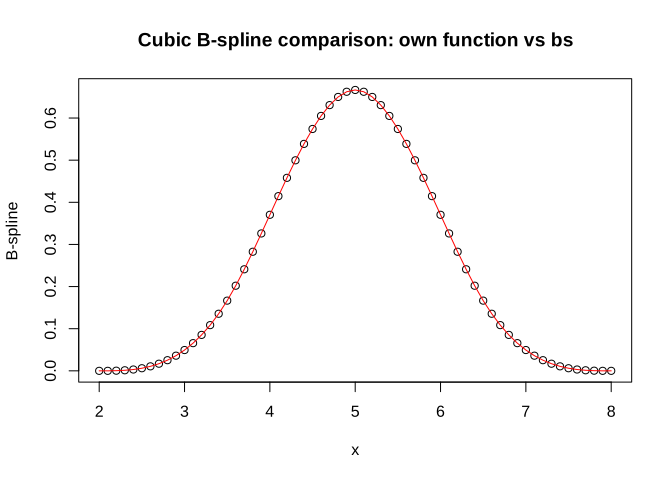
The figure shows a particular cubic B-spline, but \(f(x_i)\) in Equation (11.1) involves \(H\) splines over the range of potential values of \(x\), as we need to evaluate the splines centered at different knots. Here, we should clarify that to avoid issues with the use of splines at boundary regions, it is essential to artificially increase the number of boundary knots by repeating these knots as many times as the degree of the polynomial. For instance, in our example, the final set of knots is \(\left\{2, 2, 2, 2, 3.5, 5, 6.5, 8, 8, 8, 8\right\}\). The set of B-splines can be constructed using the Cox–de Boor recursion formula. The starting point is the B-spline of degree 0, \[\begin{align*} b_{h,0}(x_i)=\begin{Bmatrix} 1 & x_h \leq x_i < x_{h+1}\\ 0 & \text{otherwise} \end{Bmatrix}, \end{align*}\] and then, the other B-splines are defined by the recursion \[\begin{align} b_{h,p}(x_i)=\frac{x_i-x_{h}}{x_{h+p}-x_h}b_{h,p-1}(x_i)+\frac{x_{h+p+1}-x_i}{x_{h+p+1}-x_{h+1}}b_{h+1,p-1}(x_i). \end{align}\] Note that B-splines are defined by their degree and their knots.
The following code demonstrates how to perform this recursion using the same settings as in the previous code and compares the results with the bs function from the splines package. As shown in the figure, we obtain the same results. We will continue using the bs function from the splines package for convenience in the process, but it seems that we have gained some understanding of the underlying process.
cubic_bspline <- function(x, knots, degree = 3) {
    extended_knots <- c(rep(knots[1], degree), knots, rep(knots[length(knots)], degree))
    num_basis <- length(knots) + degree - 1
    basis_matrix <- matrix(0, nrow = length(x), ncol = num_basis)
    # Function to compute B-spline basis recursively
    b_spline_basis <- function(x, degree, i, knots) {
        if (degree == 0) {
            return(ifelse(x >= knots[i] & x < knots[i + 1], 1, 0))
        } else {
            left_num <- (x - knots[i])
            left_den <- (knots[i + degree] - knots[i])
            left <- ifelse(left_den != 0, (left_num / left_den) * b_spline_basis(x, degree - 1, i, knots), 0)

            right_num <- (knots[i + degree + 1] - x)
            right_den <- (knots[i + degree + 1] - knots[i + 1])
            right <- ifelse(right_den != 0, (right_num / right_den) * b_spline_basis(x, degree - 1, i + 1, knots), 0)

            return(left + right)
        }
    }

    for (i in 1:num_basis) {
        basis_matrix[, i] <- sapply(x, function(xi) b_spline_basis(xi, degree, i, extended_knots))
    }
    if(x[length(x)] == knots[length(knots)]){
        basis_matrix[length(x), num_basis] <- 1
    }
    return(basis_matrix)
}
delta <- 1.5
knotsA <- seq(2, 8, delta)
xA <- seq(2, 8, 0.1)
basis_matrix <- cubic_bspline(xA, knots = knotsA, degree = 3)
library(splines)
bs_matrix <- bs(xA, knots = knotsA[-c(1, length(knotsA))], degree = 3, intercept = TRUE, Boundary.knots = range(knotsA))
bs_matrix_matrix <- as.matrix(bs_matrix)
par(mfrow = c(1,2))
matplot(xA, basis_matrix, type = "l", lty = 1, col = rainbow(ncol(basis_matrix)), ylab = "B-spline Basis", xlab = "x", main = "Own function")
matplot(xA, bs_matrix_matrix, type = "l", lty = 1, col = rainbow(ncol(basis_matrix)), ylab = "B-spline Basis", xlab = "x", main = "bs function")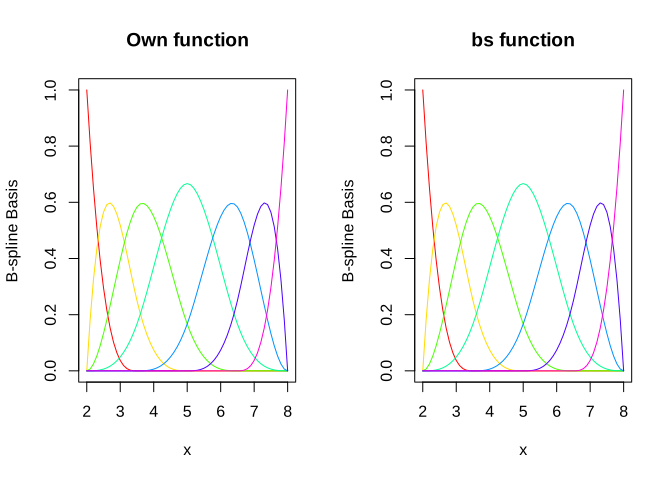
The idea in splines is to calculate the linear combination of the \(H\) B-splines, as those shown in the figure, that bets fit the dependent variable.
Splines can also be extended to non-linear models based on data augmentation, such as the probit and tobit models. Again, the basic idea is to incorporate splines into the implicit latent variables. G. M. Koop (2003) presents these extensions.
Let’s perform a simulation exercise to fix ideas.
Simulation exercise: Splines
Let’s assume that the data generating process is \[\begin{align*} y_i & = 0.4 + 0.25\sin(8x_i - 5) + 0.4\exp(-16(4x_i - 2.5)^2) + \mu_i, \end{align*}\] where \(\mu_i \sim N(0,0.15^2)\), and \(x_i\) is a sequence in \((0,1)\), with 100 random draws of the pairs \((x_i, y_i)\). In addition, we choose the knots \(\left\{0, 0.25, 0.5, 0.75, 1\right\}\). We then calculate the cubic B-splines; however, we should take into account that the last two B-spline columns generate multicollinearity issues. Therefore, we exclude them when generating random realizations of the splines by drawing the coefficients from \(N(0, 0.35^2)\). The intercept is fixed to maintain the scale in the figure, where we observe the data points, \(f(x)\), and the different splines associated with various random realizations of the coefficients. The following code demonstrates how to perform this simulation.
########### Simulation: B-splines ###########
rm(list = ls())
library(ggplot2); library(splines)
set.seed(010101)
x <- seq(0, 1, 0.001)
ysignal <- 0.4 + 0.25*sin(8*x - 5) + 0.4*exp(-16*(4*x - 2.5)^2)
sig <- 0.15
e <- rnorm(length(ysignal), 0, sd = sig)
y <- ysignal + e
N <- 100
ids <- sort(sample(1:length(ysignal), N))
xobs <- x[ids]
yobs <- y[ids]
knots <- seq(0, 1, 0.25)
BS <- bs(xobs, knots = knots, degree = 3, Boundary.knots = range(x), intercept = FALSE)
# Splines
Spline1 <- 0.56 + BS[,-c(7:8)] %*% rnorm(6, 0, 0.35)
Spline2 <- 0.56 + BS[,-c(7:8)] %*% rnorm(6, 0, 0.35)
Spline3 <- 0.56 + BS[,-c(7:8)] %*% rnorm(6, 0, 0.35)
Spline4 <- 0.56 + BS[,-c(7:8)] %*% rnorm(6, 0, 0.35)
# Create data frames for the true signal, observed data, and Splines
data_true_signal <- data.frame(x = x, y = ysignal, Type = "True Signal")
data_obs <- data.frame(x = xobs, y = yobs, Type = "Observed Data")
# Create separate data frames for each Spline
data_Spline1 <- data.frame(x = xobs, y = Spline1, Type = "Spline 1")
data_Spline2 <- data.frame(x = xobs, y = Spline2, Type = "Spline 2")
data_Spline3 <- data.frame(x = xobs, y = Spline3, Type = "Spline 3")
data_Spline4 <- data.frame(x = xobs, y = Spline4, Type = "Spline 4")
data <- rbind(data_true_signal, data_obs, data_Spline1, data_Spline2, data_Spline3, data_Spline4)
ggplot(data, aes(x = x, y = y)) + geom_line(data = subset(data, Type == "True Signal"), aes(color = "True Signal"), linewidth = 1) + geom_point(data = subset(data, Type == "Observed Data"), aes(color = "Observed Data"), shape = 16) + geom_line(data = subset(data, Type == "Spline 1"), aes(color = "Splines"), linewidth = 1, linetype = "solid") + geom_line(data = subset(data, Type == "Spline 2"), aes(color = "Splines"), linewidth = 1, linetype = "solid") + geom_line(data = subset(data, Type == "Spline 3"), aes(color = "Splines"), linewidth = 1, linetype = "solid") + geom_line(data = subset(data, Type == "Spline 4"), aes(color = "Splines"), linewidth = 1, linetype = "solid") + scale_color_manual(values = c("True Signal" = "black", "Observed Data" = "red", "Splines" = "blue")) + labs(y = "y", color = "Legend") + theme_minimal() +
theme(legend.position = "top")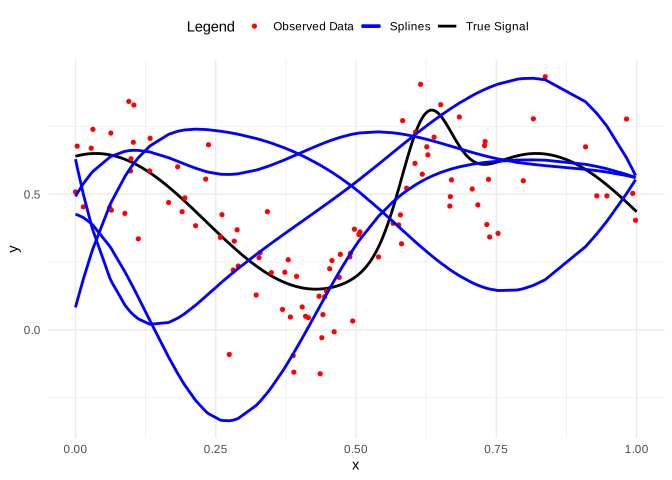
We can also use this simulation to examine the effect of changing the knots. The following code performs the fit using least squares, which is equivalent to using a non-informative prior in a Bayesian linear regression framework.
The figure illustrates the fit of different splines based on varying numbers of knots. We observe that increasing the number of knots enhances the flexibility of the spline, providing better local control. However, too many knots can result in a wiggly, overly complex fit that captures noise rather than the true underlying trend and may also increase multicollinearity. Therefore, selecting an appropriate number of knots is a crucial aspect of spline modeling. To address this issue, we can apply the strategies discussed in Chapter 10, and the strategies that will be discussed in the section of regularization in Chapter 12.
rm(list = ls())
library(ggplot2); library(splines)
# Data generation
set.seed(10101)
x <- seq(0, 1, 0.001)
ysignal <- 0.4 + 0.25*sin(8*x - 5) + 0.4*exp(-16*(4*x - 2.5)^2)
sig <- 0.15; e <- rnorm(length(ysignal), 0, sd = sig)
y <- ysignal + e; N <- 100
ids <- sort(sample(1:length(ysignal), N))
xobs <- x[ids]
yobs <- y[ids]
# Generate Fits with different knot placements
knots_list <- list(seq(0, 1, 0.33), seq(0, 1, 0.25), seq(0, 1, 0.2), seq(0, 1, 0.1))
Fits <- list()
for (i in 1:4) {
    BS <- bs(xobs, knots = knots_list[[i]], degree = 3, Boundary.knots = range(x), intercept = FALSE)
    fm <- lm(yobs ~ BS)
    Fits[[i]] <- predict(fm)
}
# Create data frames
data_true_signal <- data.frame(x = x, y = ysignal, Type = "True Signal")
data_obs <- data.frame(x = xobs, y = yobs, Type = "Observed Data")
data_preds <- data.frame(
x = rep(xobs, 4),
y = c(Fits[[1]], Fits[[2]], Fits[[3]], Fits[[4]]),
Type = rep(c("Fit 1", "Fit 2", "Fit 3", "Fit 4"), each = length(xobs))
)
data <- rbind(data_true_signal, data_obs, data_preds)

# Create ggplot
ggplot(data, aes(x = x, y = y, color = Type)) + geom_line(data = subset(data, Type == "True Signal"), linewidth = 1) + geom_point(data = subset(data, Type == "Observed Data"), shape = 16, size = 2) + geom_line(data = subset(data, grepl("Fit", Type)), linewidth = 1, linetype = "solid") + scale_color_manual(values = c("True Signal" = "black", "Observed Data" = "red", "Fit 1" = "blue", "Fit 2" = "green", "Fit 3" = "orange", "Fit 4" = "purple")) + labs(y = "y", color = "Legend") +
theme_minimal() + theme(legend.position = "top")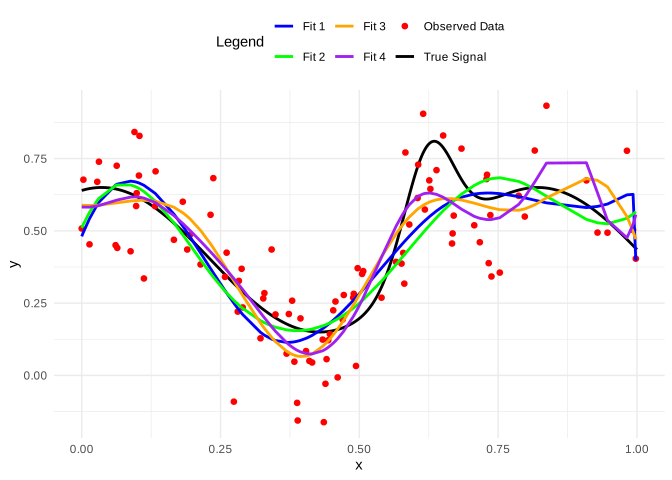
Note that splines use local information to perform the fit. This implies the curse of dimensionality issue, where increasing the number of variables leads to more dispersed regions in the regressor space. In other words, the observations become increasingly further apart as we have more regressors. As a result, splines become less reliable in high-dimensional spaces.
A strategy to overcome the curse of dimensionality is to specify the partial linear model: \[\begin{align} y_i & = \boldsymbol{z}_i^{\top}\boldsymbol{\gamma} + f(x_i) + \mu_i. \tag{11.2} \end{align}\] In this specification, some regressors enter in a linear way, while potentially the most relevant regressor — the one under primary investigation — enters in a non-parametric way. Note that we only need to increase the dimension of the matrix \(\boldsymbol{W}\) by adding the columns from \(\boldsymbol{z}\), and proceed as we did previously.
Example: Consumption of marijuana in Colombia continues
Let’s continue using the dataset MarijuanaColombia.csv to perform a partial linear model as in Equation (11.2), where \(y_i\) is the (log) marijuana monthly consumption, \(\boldsymbol{z}_i\) represents the presence of a drug dealer in the neighborhood (Dealer), gender (Female), indicators of good physical and mental health (PhysicalHealthGood and MentalHealthGood), years of education (YearsEducation), and the (log) prices of marijuana, cocaine, and crack by individual.
We set the knots as the percentiles \(\left\{0,0.05,\dots,0.95,1\right\}\) of age, use cubic B-splines, non-informative conjugate priors in the linear regression model, 5,000 MCMC iterations, and 5,000 burn-in iterations.
rm(list = ls()); set.seed(010101)
library(splines); library(ggplot2)
Data <- read.csv("https://raw.githubusercontent.com/BEsmarter-consultancy/BSTApp/refs/heads/master/DataApp/MarijuanaColombia.csv")
attach(Data)
## The following objects are masked from Data (pos = 4):
##
## Age, Age2, Dealer, Female, LogMarijuana, LogPriceCocaine,
## LogPriceCrack, LogPriceMarijuana, MentalHealthGood,
## PhysicalHealthGood, YearsEducation## The following object is masked from Data (pos = 7):
##
## Age## The following objects are masked from Data (pos = 15):
##
## Age, Female## The following objects are masked from Data (pos = 19):
##
## Age, Age2## The following objects are masked from Data (pos = 20):
##
## Age, Age2## The following objects are masked from Data (pos = 21):
##
## Age, Age2, Female## The following objects are masked from mydata:
##
## Age, Age2, Female## The following objects are masked from Data (pos = 23):
##
## Age, Age2IdOrd <- order(Age)
y <- LogMarijuana[IdOrd]
Z <- as.matrix(cbind(Data[IdOrd,-c(1, 6, 7)]))
x <- Age[IdOrd]
knots <- quantile(x, seq(0, 1, 0.05))
BS <- bs(x, knots = knots, degree = 3, Boundary.knots = range(x), intercept = FALSE)
matplot(x, BS, type = "l", lty = 1, col = rainbow(ncol(BS)))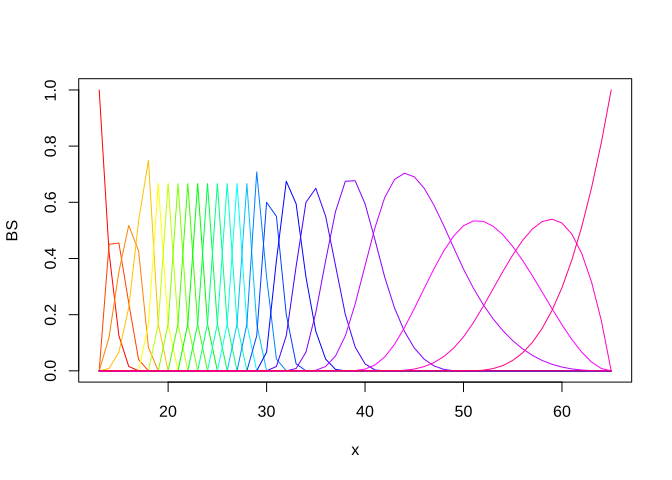
X <- cbind(1, BS[,1:22], Z) # Get B-splines without multicollinearity issues
k <- dim(X)[2]; N <- dim(X)[1]
# Hyperparameters
d0 <- 0.001; a0 <- 0.001
b0 <- rep(0, k); c0 <- 1000; B0 <- c0*diag(k); B0i <- solve(B0)
# MCMC parameters
mcmc <- 5000; burnin <- 5000
tot <- mcmc + burnin; thin <- 1
posterior  <- MCMCpack::MCMCregress(y~X-1, b0=b0, B0 = B0i, c0 = a0, d0 = d0, burnin = burnin, mcmc = mcmc, thin = thin)
summary(coda::mcmc(posterior))
##
## Iterations = 1:5000
## Thinning interval = 1
## Number of chains = 1
## Sample size per chain = 5000
##
## 1. Empirical mean and standard deviation for each variable,
## plus standard error of the mean:
##
## Mean SD Naive SE Time-series SE
## X 4.762070 1.59464 0.0225517 0.0225517
## X1 0.414460 1.14161 0.0161448 0.0161448
## X2 -0.434707 1.32159 0.0186902 0.0182422
## X3 1.200738 1.07888 0.0152577 0.0152577
## X4 1.373621 0.85336 0.0120684 0.0120684
## X5 1.676279 0.88480 0.0125129 0.0125129
## X6 1.220783 0.85900 0.0121481 0.0121481
## X7 1.241079 0.87359 0.0123544 0.0120724
## X8 1.816973 0.86389 0.0122173 0.0122173
## X9 1.773895 0.84875 0.0120031 0.0120031
## X10 1.262535 0.85882 0.0121456 0.0118736
## X11 1.458600 0.86801 0.0122755 0.0122755
## X12 1.694007 0.89295 0.0126283 0.0122990
## X13 0.969907 0.87151 0.0123250 0.0123250
## X14 2.020513 0.88300 0.0124875 0.0124875
## X15 2.096505 0.85861 0.0121426 0.0121426
## X16 1.075789 0.88201 0.0124735 0.0121409
## X17 2.271827 0.87125 0.0123214 0.0120323
## X18 1.613481 0.90826 0.0128448 0.0128448
## X19 1.649940 0.86303 0.0122050 0.0119253
## X20 1.795846 0.99558 0.0140796 0.0140796
## X21 0.551177 0.95249 0.0134702 0.0134702
## X22 1.578060 1.52457 0.0215607 0.0215607
## XLogPriceMarijuana -0.548236 0.07428 0.0010505 0.0010505
## XLogPriceCocaine 0.004347 0.09533 0.0013481 0.0013481
## XLogPriceCrack 0.230243 0.09680 0.0013689 0.0013689
## XYearsEducation -0.108868 0.01382 0.0001955 0.0001955
## XDealer 0.283355 0.09489 0.0013419 0.0012233
## XFemale -0.524882 0.10884 0.0015392 0.0015392
## XPhysicalHealthGood -0.104649 0.12127 0.0017151 0.0017444
## XMentalHealthGood 0.068732 0.10384 0.0014685 0.0014685
## sigma2 2.428064 0.10092 0.0014272 0.0014272
##
## 2. Quantiles for each variable:
##
## 2.5% 25% 50% 75% 97.5%
## X 1.55699 3.7175175 4.739009 5.80172 7.92279
## X1 -1.79003 -0.3583041 0.398603 1.19511 2.64498
## X2 -2.99804 -1.3469332 -0.448332 0.46987 2.14830
## X3 -0.92834 0.4836180 1.196875 1.92378 3.34203
## X4 -0.28717 0.7970619 1.376339 1.93079 3.08974
## X5 -0.05263 1.0887515 1.686176 2.25558 3.41183
## X6 -0.42825 0.6494850 1.217303 1.79922 2.95536
## X7 -0.46407 0.6662542 1.239668 1.82647 2.96068
## X8 0.13876 1.2494689 1.812351 2.40049 3.53973
## X9 0.14501 1.1917504 1.776206 2.33589 3.43701
## X10 -0.40892 0.6947791 1.272198 1.82679 2.96285
## X11 -0.23940 0.8657272 1.456057 2.05675 3.20787
## X12 -0.06415 1.1114082 1.714477 2.27762 3.45773
## X13 -0.72303 0.3695078 0.978630 1.55659 2.69103
## X14 0.27912 1.4376210 2.018344 2.60509 3.77226
## X15 0.41493 1.5289959 2.098777 2.66159 3.80006
## X16 -0.59638 0.4805844 1.064190 1.67853 2.82543
## X17 0.58853 1.6874131 2.267223 2.85066 3.98668
## X18 -0.17849 0.9960272 1.618077 2.20946 3.45835
## X19 -0.01256 1.0733493 1.640711 2.21205 3.34662
## X20 -0.15662 1.1339269 1.789473 2.45008 3.75248
## X21 -1.28909 -0.1001288 0.544697 1.20134 2.43123
## X22 -1.51384 0.5779855 1.564216 2.59474 4.62015
## XLogPriceMarijuana -0.69875 -0.5969960 -0.547761 -0.49908 -0.40337
## XLogPriceCocaine -0.18313 -0.0562270 0.002893 0.06634 0.19409
## XLogPriceCrack 0.03801 0.1655022 0.230836 0.29429 0.42126
## XYearsEducation -0.13605 -0.1180723 -0.108845 -0.09958 -0.08225
## XDealer 0.09831 0.2186432 0.284203 0.34647 0.47046
## XFemale -0.73478 -0.5975294 -0.523892 -0.45189 -0.30925
## XPhysicalHealthGood -0.33999 -0.1863400 -0.105786 -0.02289 0.13607
## XMentalHealthGood -0.13261 -0.0005379 0.066461 0.13917 0.27269
## sigma2 2.23758 2.3591542 2.424957 2.49384 2.63860# Predict values with 95% credible intervals
xfit <- seq(min(x), max(x), 0.2)
H <- length(xfit)
i <- sample(1:N, 1)
idfit <- sample(1:N, H)
BSfit <- bs(xfit, knots = knots, degree = 3, Boundary.knots = range(x), intercept = FALSE)
Xfit <- cbind(1, BSfit[,1:22], Z[rep(i, H),]) # Relevant regressors, PIP > 0.5
Fit <- matrix(NA, mcmc, H)
# posterior[posterior > 0] <- 0
for(s in 1:mcmc){
Fit[s,] <- Xfit%*%posterior[s,1:31]
}
# Create a data frame for ggplot
plot_data <- data.frame(x = xfit, fit = colMeans(Fit), liminf = apply(Fit, 2, quantile, 0.025), limsup = apply(Fit, 2, quantile, 0.975))
ggplot() + geom_line(data = plot_data, aes(x, fit), color = "blue", linewidth = 1) + geom_ribbon(data = plot_data, aes(x, ymin = liminf, ymax = limsup), fill = "blue", alpha = 0.2) + labs(title = "B-Spline Regression with 95% Confidence Interval", x = "Age", y = "Log Marijuana") + theme_minimal()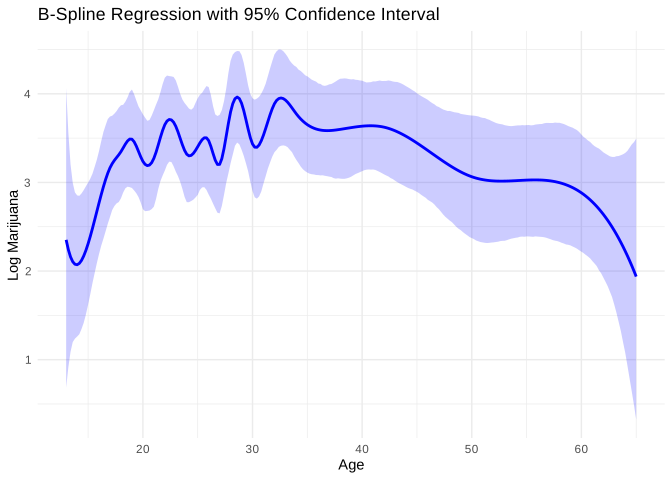
The previous code illustrates the procedure. The posterior 95% credible intervals indicate that marijuana is an inelastic good, there is substitution between marijuana and crack, more educated female individuals consume less, and the presence of a drug dealer in the neighborhood increases consumption.
The figure shows the fitted spline, specifically the mean (blue line) and the 95% credible intervals (shaded blue). Notice that there is a lot of wiggliness due to the use of many knots, suggesting that this relationship could be expressed in a more parsimonious way. In Exercise 7, we ask to use variable selection methods, such as the BIC approximation presented in Chapter 10, to perform regressor selection, particularly for the splines.
In general, the selection of \(H\) is a problem of variable selection (regressor uncertainty) and can be handled using other approaches, such as those discussed in the regularization section of the following chapter.