5.3 Multivariate models
After deploying our GUI (see Figure 5.1), the user should select Multivariate Models from the top panel. Figure 5.6 will then appear, displaying a radio button on the left-hand side that lists the specific models within this category.
Figure 5.6 illustrates the setup for multivariate regression models. The input file should first include the dependent variables, followed by the regressors. If each equation includes an intercept, a column of ones must be added after the dependent variables in the input file. Once the file is uploaded, users can preview the data.
The user must then specify the number of dependent variables and regressors, indicate whether an intercept should be included, and define the hyperparameter values (see Figure 5.6).
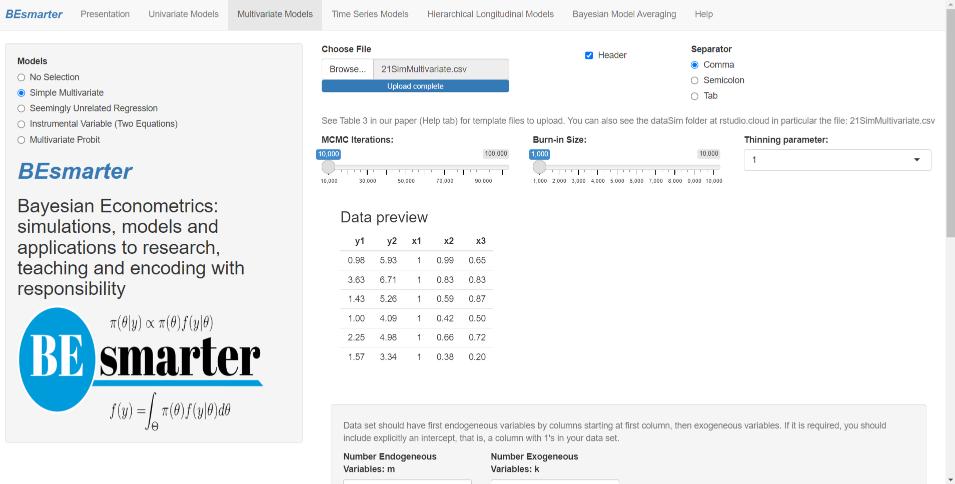
Figure 5.6: Multivariate models: Simple multivariate.
In seemingly unrelated regressions, the input file should first include the dependent variables, followed by the regressors for each equation, including the intercept (a column of ones) if applicable. Users must specify the number of dependent variables (equations), the total number of regressors (i.e., the sum of all regressors across equations), and the number of regressors per equation (including the intercept if relevant). Users may also define the values of the hyperparameters if prior information is available.
For both simple multivariate and seemingly unrelated regression models, the results first display the posterior estimates of the location parameters by equation, followed by the posterior covariance matrix.
In the instrumental variable setting, users must specify both the main equation and the instrumental equation. Intercepts are included by default. The first variable on the right-hand side of the main equation must correspond to the endogenous regressor. In the instrumental equation, this endogenous variable serves as the dependent variable and is modeled as a function of the instruments. Users may also specify hyperparameter values if prior information is available. The input file should contain the dependent variable, the endogenous regressor, the instruments, and the exogenous regressors. The results first report the posterior estimates of the endogenous regressor, followed by the location parameters of the auxiliary (instrumental) regression, the location parameters of the exogenous regressors, and finally, the posterior covariance matrix.
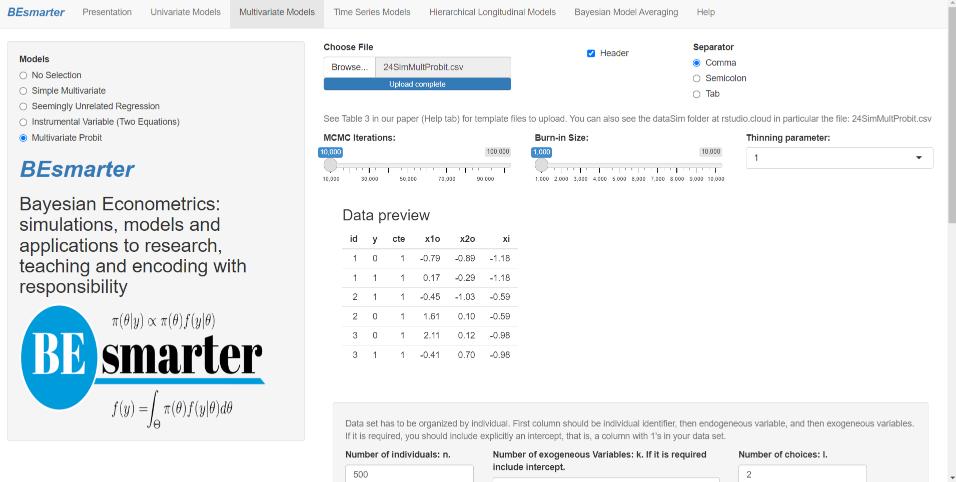
Figure 5.7: Multivariate models: Multivariate probit.
The multivariate probit model requires the input dataset to be ordered by unit. For example, if there are three choices, each unit should appear three times in the dataset. The first column must contain a unique identifier for each unit, using ordered integers. The next column should contain the dependent variable, represented as a single vector of 0s and 1s, followed by the regressors, which must include a column of ones for the intercepts. Users must specify the number of units, the number of regressors, and the number of choices (see Figure 5.7). The results first display the posterior estimates of the location parameters by equation, followed by the posterior covariance matrix.